
See each day of your trip on a map
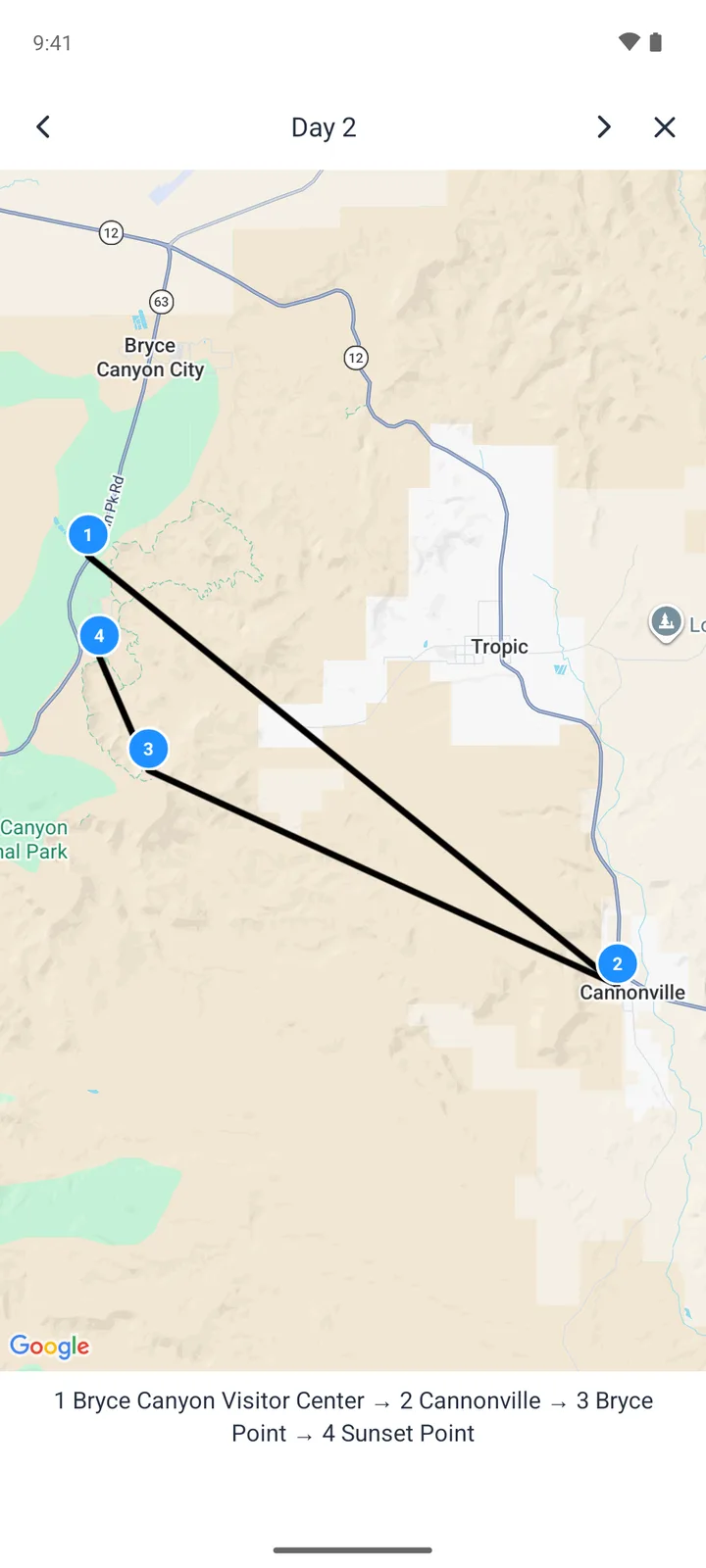
Each day of an itinerary has its own map, with that day's stops numbered in the order you visit them and arrows that move to the next day.
To open an itinerary, go to the Calendar tab, tap the view button left of the date and choose Travel. Then tap Itineraries and pick one. On its Itinerary tab, each day lists its stops with their times and places.
Tap the map button beside a day’s heading (it looks like a folded map). The map shows that day’s stops as numbered pins, in the order you visit them, with the list of stops underneath. The arrows at the top move to the day before or the day after.
Stops whose Location is the same City or region share one pin. To give a stop its own pin, go back to the Itinerary tab and set its Location to a Specific place, in Add Item or in Edit under the stop.
From the store listing
From the release notes Podz published on the App Store.
Better Trips. Smarter Planning. More Time Together.
We've made planning your next adventure with Podz even easier - from discovering where to go to building the perfect itinerary and keeping every detail organized.
SMARTER ITINERARIES, BETTER PLANNING
• See your day on a map. New daily itinerary maps let you visualize your activities and stops for any day of your trip. See where you're going, understand how everything fits together, and make smarter routing decisions - especially on longer trips.
• Better plans for when you're actually going. Ask Podz can now build itineraries around your exact travel dates, taking local holidays, seasonal schedules, and attraction opening hours into account when available. That means fewer recommendations for places that may be closed - and more time enjoying your trip.
• Less answering, more exploring. Ask Podz remembers your preferences as you plan, asks fewer repetitive questions, and creates itineraries tailored to your interests.
• From inspiration to itinerary. Explore suggested routes, choose your own destinations, and turn recommendations into plans with a single tap.
EVERY TRAVEL DETAIL IN ONE PLACE
• Get there with confidence. Flights, trains, taxis, and car services now have clearer departure, arrival, and pick-up details, including times, locations, and directions.
• Stay organized. Keep transportation routes, confirmation details, and reservations together so everyone knows where to be and when.
• Plan faster. Create trips more quickly, whether you're starting from scratch or exploring somewhere new.
A SMOOTHER PODZ EXPERIENCE
We've improved layouts across iPhone sizes, made event management faster, and fixed issues with trip participants, transportation details, and navigation.
Your people. Your plans. One shared place.
Steps checked on Android; iPhone screens may look slightly different. Checked in Podz 2.20.55 on Nov 10, 2026.